LifelockWhat Is LifeLock and How Does It Work? A Plain Guide to Monitoring, Alerts and Restoration
What Is LifeLock and How Does It Work? A Plain Guide to Monitoring, Alerts and Restoration
The short answer
LifeLock is an identity theft protection service owned by Norton. You give it personal details, and it watches your credit files, bank and card accounts, and public places where your information can appear, such as the dark web. When it spots a possible problem, like a new credit account in your name or a data exposure, it sends you an alert. Some plans add credit and account locks, data broker removal, and help restoring your identity after theft.
Some links on this site are affiliate links: if you buy through one, the site may earn a commission at no extra cost to you. More about this.
What this guide covers:
- What each feature does: monitoring, alerts, credit and account locks, data broker removal, and restoration.
- How the setup works: what you hand over, which accounts you connect, and what happens day to day.
- What you can do yourself: which parts free credit freezes, fraud alerts and free credit reports already handle.
- Where the limits are: gaps reviewers have pointed out, such as how the credit lock covers only some bureaus.
- How the picks were chosen: the criteria used to compare LifeLock with other services.
If you got a data breach notice, or you have already been hit by a scam, you probably want to know whether a paid service will actually help. You want alerts that arrive in time to matter, and you do not want to pay for coverage you could get for free. This guide aims to give you a clear answer to that.
Here is how this guide works. It starts with what LifeLock does day to day, before any judgement on value. Then it explains what the free tools cover, where the paid plan goes further, and what the limits are. Along the way it draws on hands-on reviews by other people, credited by name, so you can weigh their findings against your own situation. The aim is to help you decide what fits you, not to push you toward a plan.
What LifeLock Is and Who Owns It
LifeLock is an identity theft protection service. It is now part of the Norton brand, which is owned by Gen Digital. If you have seen the Norton name on antivirus software, the LifeLock product sits in the same family of consumer security services.
It helps to be clear about what LifeLock does not do. It cannot stop a company from losing your data in a breach. It cannot stop a scammer from calling you or sending you a fake email. Those events happen outside your control. What LifeLock does is watch for signs that your personal information is being misused, and then tell you about it.
That watching happens through monitoring and alerts. You give the service some of your personal information, and it checks for activity connected to your credit, accounts and data. When it sees something unusual, it sends you an alert so you can act.
LifeLock is a subscription, and it comes in tiers. The features you get depend on the plan you pick. A basic plan may cover fewer credit bureaus or fewer types of alerts than a higher one. Before you pay, check exactly what your tier includes.
How Monitoring and Alerts Work Day to Day
Most of what LifeLock does runs in the background. You set it up once, then it watches for a few kinds of trouble. Three types of monitoring do most of the work.
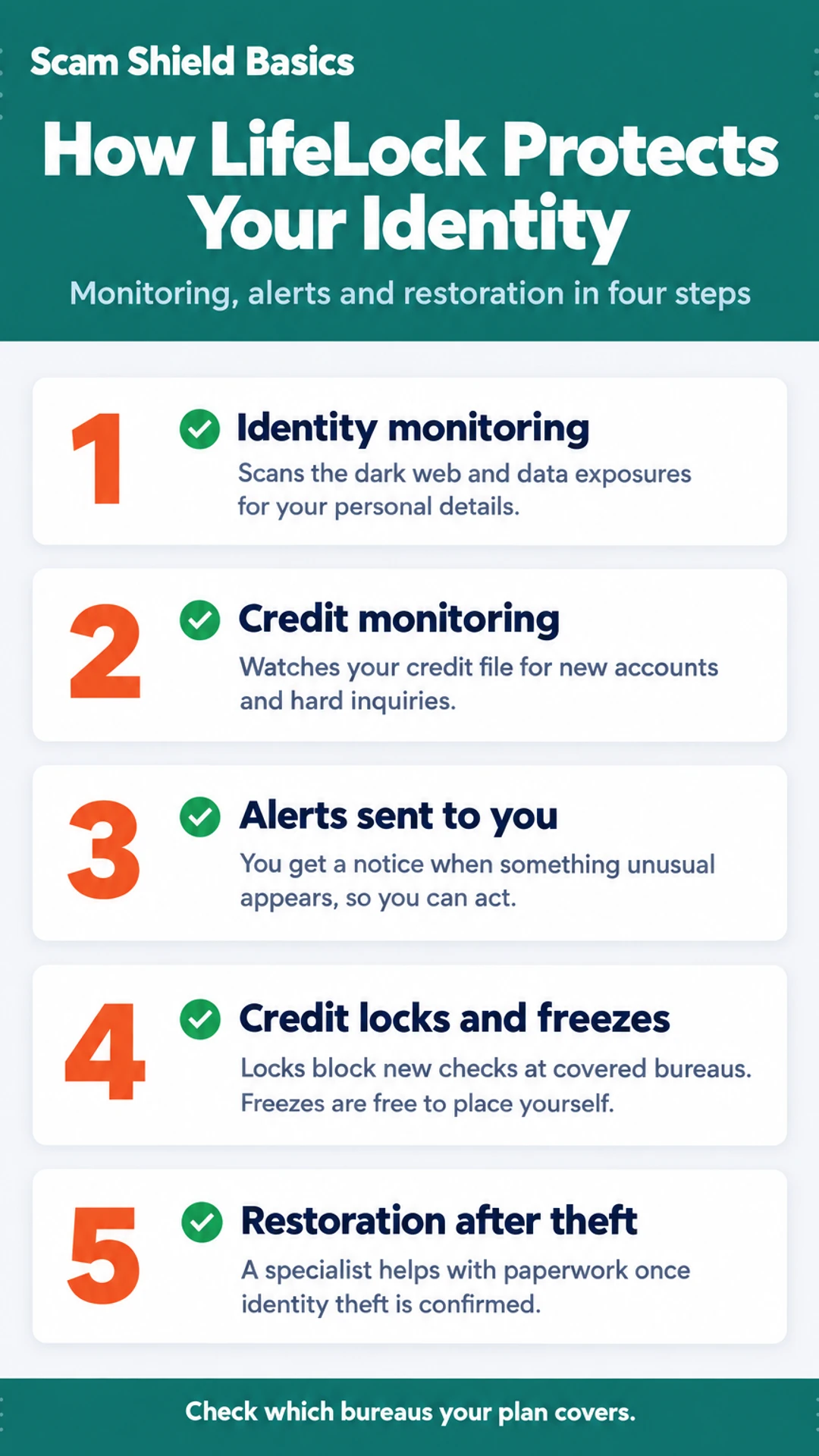
Identity monitoring scans for your personal information on the dark web and in known data exposures. That usually means your name, Social Security number, email addresses, phone number, and card details. If one of those shows up in a leak, you get a notice. Finance Pulse noted that the automated data broker removal is the feature they valued most, since it runs on its own and repeats about every 90 days.
Credit monitoring watches your credit file for new accounts, hard inquiries, and changes. How much it sees depends on the plan. Some tiers cover only two of the three bureaus. The Opt Out Project found that LifeLock Core monitors two bureaus, and three-bureau coverage requires the higher Advanced tier. Check which bureaus your plan covers before you assume you are fully watched.
Financial and account monitoring can flag unusual activity on bank and card accounts you link. Linking takes a few minutes per account, and then the connection mostly runs without attention.
What does a typical alert look like?
Here is one realistic case. Someone applies for a store credit card in your name. The lender pulls your credit file, which is a hard inquiry at one bureau. The monitoring service sees the new inquiry and sends you a notification with the lender's name, the date, and the bureau involved.
What you do next:
- Check whether you applied. If you did not, treat the alert as serious.
- Log in and review the details, then contact the lender listed.
- Freeze your credit at the bureaus if you want to stop further applications.
- File an identity theft report at IdentityTheft.gov if the application was fraudulent.
Credit Locks, Freezes and Data Removal
Most of what LifeLock does for your credit comes down to two tools: locks and freezes. They work in a similar way, and it helps to know the difference.
A credit lock blocks new credit checks at the bureau it covers. If a lender cannot pull your report, it usually cannot open an account in your name. LifeLock's lock is one of these, but it covers only the bureau or bureaus the plan names, so check which ones yours includes.
A credit freeze does much the same job, and you can place one yourself for free. You contact Equifax, Experian and TransUnion separately, and each one freezes your file on its own. You can lift a freeze when you need to apply for credit and place it again afterward. One thing to keep in mind: a lock on one bureau does not protect the other two.
Data removal works differently. Data broker removal searches public sites for your personal information and sends requests asking them to take it down. These sites collect names, addresses, phone numbers and relatives' names, and they often repost data after it has been removed. For that reason, LifeLock's version runs on a repeating schedule, not as a single request. One reviewer, Finance Pulse, said the automated removal and alerts were the main reason to pay, and noted that the credit lock covered only TransUnion.
Before you sign up, know what cancelling does. In Finance Pulse's review, the reviewer pointed out that cancelling switches off LifeLock's lock, while a freeze you placed yourself would stay in place. Find out what happens to each lock before you cancel.
Identity Restoration and Insurance
Monitoring tells you something may be wrong. Restoration is what happens after you confirm that someone has used your identity. Those are two separate things, and it helps to know the difference before you sign up.
What happens when theft is confirmed?
Once you report identity theft, a restoration specialist is assigned to your case. Their job is mostly paperwork. They help you:
- Write up what happened and gather the records that prove it
- Contact banks and lenders about accounts opened or charged in your name
- Notify the credit bureaus so fraudulent entries get removed
- Follow up with government agencies when the theft involves benefits or tax records
This is real help, and it saves a lot of phone time. It does not mean the specialist can make a bank reverse a charge on their own authority. The bank still decides, and you may still need to follow up yourself.
Does the insurance pay out?
Many identity protection plans list a reimbursement benefit for costs tied to theft, such as lost wages or certain expenses. Read the terms before you count on it. The policy will spell out what counts, what is excluded, and what paperwork you need to file a claim.
Do not assume the headline amount applies to every case. Limits often depend on the plan tier, the type of loss, and whether the loss meets specific conditions. Find the exclusions section and read it first. That is where most surprises come from.
Plans, Setup and What Changes Between Tiers
LifeLock sells its service in tiers. The three names you will see are Core, Advanced and Total. The main difference is how many credit bureaus the service watches and which extra features come with each plan. Core covers fewer bureaus. Advanced adds three-bureau monitoring. Total adds more coverage and more features on top. The exact feature list changes over time, so read the current tier comparison on the official site before you choose.
What changes between tiers?
- Credit bureau coverage: how many of the three major bureaus (Equifax, Experian and TransUnion) are monitored for new accounts.
- Extra features: things like identity restoration help, insurance terms and added alerts may differ by tier.
- Price: each step up costs more per month.
What does setup involve?
Setup usually follows the same steps. You enter your personal details, choose a plan, and link your accounts so the service can watch them. In a recent walkthrough, one reviewer, Finance Pulse, said the whole setup took about 20 minutes. Linking a bank account through Plaid took about 30 seconds per account, and the reviewer said it needed no further attention after that. Plan on a few minutes per account, plus whatever time it takes to answer the identity questions.
Check the price before you sign up.
First-year offers often look cheaper than later rates. Read the renewal terms on the official site before you enter payment details. Write down the renewal date so you are not surprised.
LifeLock plan tiers at a glance
| Tier | Credit bureaus monitored | Extra features |
|---|---|---|
| Core | Two bureaus | Not stated |
| Advanced | Three bureaus | Not stated |
| Total | Not stated | More coverage than lower tiers |
Limits, Trade-offs and Free Alternatives
LifeLock is not a complete shield, and it helps to know where its edges are before you pay for it.
Start with the bureaus. Some LifeLock plans monitor only two of the three major credit bureaus, TransUnion, Equifax and Experian. Full three-bureau monitoring is available on higher tiers. Locks work the same way. A reviewer in Finance Pulse's walkthrough noted that the credit lock covers only TransUnion, so check which bureaus a given feature actually touches before you assume it covers everything.
Scam coverage also varies. Do not assume every tier protects you from every scam. Finance Pulse said the Core plan has no scam coverage, so read the plan details closely.
Now the free options. You can get free credit reports from each bureau, and you can place a credit freeze at each bureau for no charge. A freeze stops new accounts from being opened in your name, which covers a lot of the same ground as a paid credit lock. The main difference is that you handle the steps yourself. Free freezes at each bureau are worth doing before you spend anything.
Reviews also raise specific concerns, and they come from individual testers, not from me or a lab. The Tech Roost reviewer reported slow alerts in one simulated test, with 2 to 3 minute delays for modest services. The Opt Out Project team found fewer dark web alerts than a competitor in a head-to-head test. Others flagged upsell pressure on support calls. I have not tested these myself, so treat them as one person's findings to weigh against your own needs.
Free options compared with LifeLock
| Option | Cost | What you handle yourself |
|---|---|---|
| Credit freeze at each bureau | Free | Lifting and reapplying the freeze |
| Free credit reports | Free | Reviewing reports for errors |
| LifeLock credit lock | Paid plan | Covers only the bureaus the plan names |
What hands-on reviewers found
These are other people's hands-on tests, summarised and credited to them. Watch the full videos for their complete reviews.
Finance Pulse: LifeLock Tutorial 2026: Full Setup Walkthrough & Honest Review 🛡️
The reviewer thinks LifeLock is worth paying for mainly for its automated data broker removal and alerts, while noting it has real gaps: the credit lock covers only TransUnion, Core lacks scam coverage, and cancelling does not lift the lock
- The whole LifeLock setup took about 20 minutes, covering plan selection, signup, credit locking, alerts and monitoring. (at 0:18)
- Connecting a bank account through Plaid took about 30 seconds per account, and the reviewer says it needs no further attention afterward. (at 1:36)
- The reviewer says the credit lock and payday loan lock can be toggled from a phone, which matters when someone is at a car dealership. (at 2:45)
The Tech Roost: Lifelock Review - Here’s Who It’s Actually For
The reviewer thinks LifeLock is a legitimate product but suited only to a specific buyer who wants the Norton name, antivirus and VPN and will pay more for them, and considers Aura the better fit for most people.
- Compared to the rest of the category, LifeLock has real strengths: brand recognition, a strong VPN, and antivirus from the Norton ecosystem that does not slow the computer down. (at 0:34)
- In side-by-side testing that simulated a credit check or major purchase, LifeLock consistently came in last on alert speed, with the reviewer citing 2 to 3 minute alerts for modest services. (at 2:59)
- During the reviewer's first on-camera LifeLock signup call about a hypothetical problem, the representative would not let them hang up before pitching a coverage upgrade. (at 4:20)
Frequently asked questions
What are the downsides of LifeLock?
The main downsides reviewers point to are gaps in coverage and cost. Some tests found the credit lock covers only one bureau, TransUnion. Three-bureau monitoring sits in a higher tier, and a reviewer noted that cancelling switches the lock off, though a legal freeze stays in place. Alert speed and upgrade pitches on support calls also came up.
How much does LifeLock charge per month?
One reviewer reported LifeLock Core at $12.49 a month and Advanced at $19.99 a month, with three-bureau monitoring only in Advanced. These were the prices that reviewer recorded at the time of their test. Prices change, so check the current figures before you sign up, and check the renewal rate too, since it can differ from the first-year offer.
What does LifeLock do that I can't do myself?
Much of what LifeLock offers can be done by hand: you can freeze your credit with each bureau, pull free credit reports, and set up fraud alerts. The paid service mainly adds automation, such as ongoing alerts, data broker removal that repeats on a schedule, and help handling paperwork if your identity is stolen. Whether that is worth the cost depends on how much of that work you want to avoid.
Is there a better option than LifeLock?
It depends on what you need. One reviewer found Aura to have friendlier support, no tiers and a lower price, and rated its dark web alerts higher. Another reviewer called LifeLock legitimate but suited to buyers who want the Norton name, antivirus and VPN. Compare what each service covers against the free tools you already have before choosing.
Do I need LifeLock if I already have free credit freezes?
Free credit freezes and free credit reports already stop new accounts from being opened in your name and let you check for problems. A paid service adds ongoing alerts and recovery help, which the freezes do not provide. If you are comfortable watching your own reports and alerts, you may not need the extra layer. If you want someone else to handle the monitoring and paperwork, the paid option may suit you better.
Wrapping up
LifeLock does its work through monitoring, alerts, credit locks and recovery help, and most of the basic protections are free to set up yourself. The paid part is about automation and support, so weigh that against what you are willing to manage on your own. Have you tried free credit freezes, and did they feel like enough for you? Share your experience in the comments.