LifelockIs LifeLock Legit? Privacy, Data Handling and Insurance Terms Explained
Is LifeLock Legit? Privacy, Data Handling and Insurance Terms Explained
The short answer
LifeLock is a legitimate company, owned by Gen Digital (formerly NortonLifeLock). It has faced past regulatory action over how it handled some promises and customer data. Whether it is worth paying for depends on what you need: its paid plans add monitoring and support on top of free tools like credit freezes. Check the data policy and the insurance conditions before you sign up.
Some links on this site are affiliate links: if you buy through one, the site may earn a commission at no extra cost to you. More about this.
- Data handling: what LifeLock stores about you, what it shares, and how to limit it.
- Insurance and reimbursement: what the promised coverage really pays out for and the conditions attached.
- Free alternatives: which protections you can set up yourself at no cost.
- Tier differences: where the paid levels differ, and what the reviewers found missing.
- Who it suits: the kind of buyer for whom the subscription makes sense, and who should skip it.
If you have ever gotten a data breach notice and wondered whether your Social Security number or card details are now circulating, you are not alone. Plenty of families reach this point and then face a sales page that promises protection without saying exactly what it does. You deserve a clearer picture before you hand over a card number.
This page looks at the trust questions that matter most: how LifeLock stores and shares your personal information, and what conditions apply to any insurance or reimbursement promise. Those details are easy to skim past, and they are often where the real answer sits.
I come at this as someone who would rather read the fine print than trust the headline, and I'd suggest you do the same. Here is how the rest of this page works. We look at each of those trust questions in turn, then pull in what other hands-on reviewers found. Where the picks, comparisons or tests come from other people, I say so and name them. Where I have not tested something myself, I say that too.
Is LifeLock a Legitimate Company?
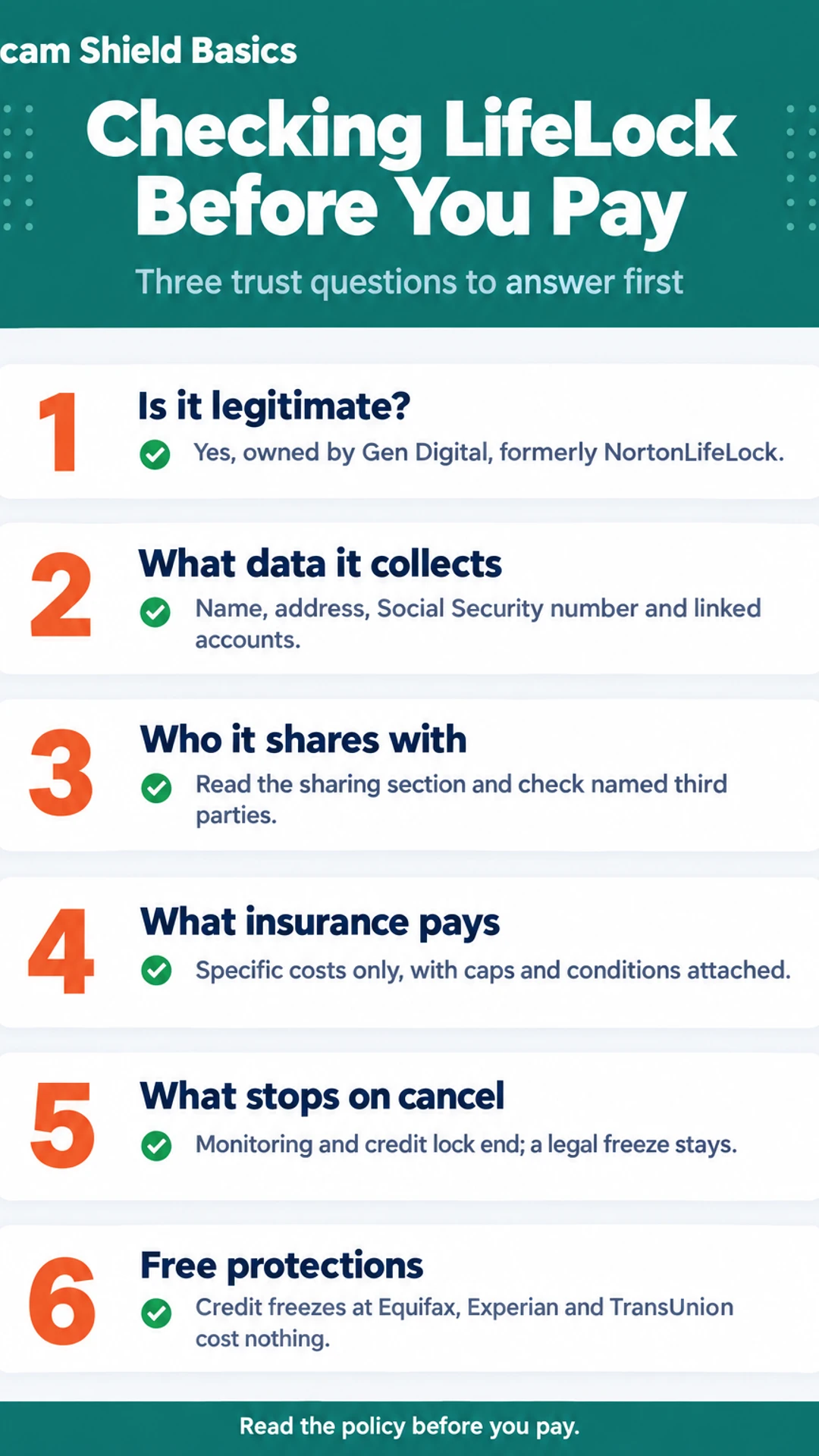
Yes. LifeLock is a real company, owned by Gen Digital, the business formerly known as NortonLifeLock. It is not a scam, and it has been operating as an identity protection provider for many years.
Legitimate, though, only answers one question. It does not tell you whether the product is worth what you pay. A real company can still sell a plan that is overpriced for your situation. If you already freeze your credit and check your reports for free, you may be paying for things you can do yourself. If you have had a breach notice or a fraud attempt, the same plan may be more useful to you.
The company's past is part of the picture. LifeLock was the subject of regulatory action over how it marketed its services and handled customer protections. It also had a 2018 data breach affecting about 500 users, as reported by U.S. News. That incident is worth knowing about. It does not mean the company is untrustworthy today, but it is a reason to read the privacy terms and the insurance conditions closely rather than trusting the marketing.
A few things to check before you sign up:
- What the plan actually monitors, and how many credit bureaus it covers
- Whether the insurance or reimbursement promise has conditions attached
- What the renewal price will be after the first year
The rest of this page looks at how your information is handled and what the coverage terms really say.
How LifeLock Handles Your Personal Information
Before you pay for any identity protection service, it helps to know what it will ask you for and where that information goes. Here is what to look for.
What information does LifeLock need from you?
Most plans need some combination of the following:
- Your full name, address, and date of birth
- Your Social Security number, so it can watch for it in credit files and data leaks
- Linked bank or card accounts, so it can send account alerts
The bank and card links are the part people hesitate over. They are what let the service flag unusual activity quickly, but they also mean you are giving a third party a view into your accounts. Only link what you are comfortable sharing.
How do you read the privacy policy?
The policy is long, but three sections answer most of your questions:
- Collection. Which details it gathers, and whether it collects anything beyond what you enter.
- Sharing. Who receives your information, including partners and service providers. Look for the words "third parties" and check whether they are named.
- Retention. How long your information is kept after you cancel. A specific period is a good sign. Vague wording like "as long as necessary" tells you little.
What does the data broker removal feature actually do?
Data brokers collect and sell personal details about you. This feature sends removal requests to those brokers on your behalf. Finance Pulse reports that the removal runs automatically and repeats every 90 days, which is why that reviewer keeps the subscription active. Removal is not permanent, because brokers can collect your details again, so the repeat schedule is the point.
How do you request deletion, and what happens if you cancel?
You can usually ask the company to delete your information directly. Check the privacy policy or account settings for the process, and keep a record of your request. If you cancel, confirm what happens to your credit lock. Finance Pulse notes that cancelling switches the lock off, while a legal freeze you placed yourself stays in place. Check this before you cancel.
What the Insurance and Reimbursement Promise Actually Covers
Identity theft insurance sounds like a check you get when something goes wrong. Usually it is not. Most policies reimburse specific costs, such as lost wages from time off work, legal fees, or certain out-of-pocket expenses tied to recovery. They do not pay a fixed amount for any loss.
Before you count on a promise, look for the conditions attached to it. Most policies require:
- A police report filed for the theft
- Prompt notice to the company, often within a set number of days
- Documentation of every cost you want reimbursed
- Enrollment in the plan before the theft happened
Miss one of these and a claim can be denied, even when the theft is real.
Headline coverage amounts are usually maximums, and they come with exclusions. A plan may advertise a large figure but cap individual categories far lower. Read the actual policy document, not the marketing page. The policy is where the limits, exclusions and claim deadlines appear.
Ask these questions before you rely on any identity insurance:
- What specific costs are reimbursed, and what is the cap for each?
- Does the policy require a police report, and how soon must I file it?
- How long do I have to notify the company after I discover the theft?
- What is excluded, and does the policy cover losses from scams I approved myself?
- Who underwrites the policy, and where can I read the full terms?
If the answers are vague, treat the promise as unproven.
What Happens If You Cancel
Cancelling a LifeLock plan does not undo everything at once. Some protections stop right away, and others stay in place. It helps to know which is which before you cancel.
Finance Pulse, a reviewer who tested the service, points out that cancelling can switch off the LifeLock credit lock. A credit lock is a feature of the subscription, so when the plan ends, the lock ends with it.
A legal credit freeze is different. If you place one directly with the bureaus (Equifax, Experian and TransUnion), it is not tied to your subscription. It stays in place until you lift it yourself. Freezes are free, so you can set one up on your own and keep it going after you cancel.
Here is what usually stops when the plan ends:
- Monitoring and account alerts
- Dark web and new-account alerts
- Any credit lock placed through the service
- Regular data removal runs, which may not repeat
On that last point, Finance Pulse notes that automated data broker removal runs on a schedule, and removal requests may not keep being repeated once you leave. Treat any removal as a one-time result unless you check that it has stuck.
Before you cancel, check whether the information you gave the service can be deleted on request. Ask for deletion in writing if the process is unclear, and keep copies of every confirmation you receive. That gives you a record if anything comes back later.
Free Tools That Cover Much of the Same Ground
Before you pay for anything, know that a lot of basic protection is free. You can do most of it yourself in an afternoon.
Credit freezes. A credit freeze blocks new credit checks at the three bureaus: Equifax, Experian and TransUnion. Most lenders will not open an account if they cannot see your credit file, so a freeze stops many new-account frauds. It costs nothing, and you can lift it whenever you need to apply for credit. You place each freeze on the bureau's own website. Be careful to use the official site, since scam pages imitate them.
Fraud alerts. A fraud alert tells lenders to verify your identity before opening credit. It is free and lasts for a set period, after which you can renew it. Place it with one bureau and that bureau has to tell the others.
Free credit reports. You can check your reports from all three bureaus at annualcreditreport.com, the official free source set up under federal law. Look for accounts or inquiries you do not recognize. You can also pull reports on a regular schedule so you catch changes early.
Here is the honest gap. Free tools do not watch the dark web for your details, remove your information from data brokers, or pay you if something goes wrong. Those are the things a paid plan like LifeLock adds, and they are the things you should weigh against the monthly cost.
What a paid plan adds versus free tools
| Option | What it does | Cost |
|---|---|---|
| Credit freeze at bureaus | Blocks new credit checks | Free |
| Fraud alert | Asks lenders to verify identity | Free |
| Free credit reports | Lets you review all three reports | Free |
| Paid plan monitoring | Dark web and account alerts | Not stated |
| Paid plan data removal | Sends removal requests to data brokers | Not stated |
| Paid plan reimbursement | Insurance-style cost coverage | Not stated |
Who LifeLock Is For, and Who Can Skip It
LifeLock tends to fit a few specific situations. It is not a good match for everyone, and some buyers would do better with free tools or a different service.
Who it often suits
- You got a data breach notice. If a company you use says your Social Security number, email, or card details were exposed, you may want ongoing alerts and help if something gets misused.
- You have already been defrauded. If someone has opened an account in your name or tried a scam on you, monitoring can give you an early warning if it happens again.
- You already use Norton and want one bill. If you pay for Norton security software, the bundle may save you from piecing together separate tools.
Who can probably skip it
- You only want a credit freeze. Freezes at the three bureaus are free, and you can place them yourself. A paid plan does not add much here.
- You are comfortable checking your own reports. You can pull free credit reports and watch your bank statements. If that routine feels manageable, you may not need to pay someone else to do it.
- Price matters most. The gap between tiers can be hard to see, and renewal prices are often higher than the first-year offer. If budget is tight, compare the cost against free options first.
Reviewers' views on alternatives
The Tech Roost and The Opt Out Project each favored Aura for value and customer service. Both described LifeLock's higher tiers as costly. These are their opinions, not ours. For pricing details, cancellation steps, and side-by-side comparisons, see the hub page and the related guides linked from this site.
Who it suits and who can skip it
| Buyer situation | Likely fit | Why |
|---|---|---|
| Got a data breach notice | Often suits | Ongoing alerts if information is misused |
| Already defrauded | Often suits | Early warning if it happens again |
| Uses Norton already | Often suits | One bill for bundled tools |
| Only wants a credit freeze | Can skip | Freezes at bureaus are free |
| Comfortable checking reports | Can skip | Free reports and statements cover it |
| Price matters most | Can skip | Renewal prices can be higher |
What hands-on reviewers found
These are other people's hands-on tests, summarised and credited to them. Watch the full videos for their complete reviews.
Finance Pulse: LifeLock Tutorial 2026: Full Setup Walkthrough & Honest Review 🛡️
The reviewer thinks LifeLock is worth paying for mainly for its automated data broker removal and alerts, while noting it has real gaps: the credit lock covers only TransUnion, Core lacks scam coverage, and cancelling does not lift the lock
- The whole LifeLock setup took about 20 minutes, covering plan selection, signup, credit locking, alerts and monitoring. (at 0:18)
- Connecting a bank account through Plaid took about 30 seconds per account, and the reviewer says it needs no further attention afterward. (at 1:36)
- The reviewer says the credit lock and payday loan lock can be toggled from a phone, which matters when someone is at a car dealership. (at 2:45)
The Tech Roost: Lifelock Review - Here’s Who It’s Actually For
The reviewer thinks LifeLock is a legitimate product but suited only to a specific buyer who wants the Norton name, antivirus and VPN and will pay more for them, and considers Aura the better fit for most people.
- Compared to the rest of the category, LifeLock has real strengths: brand recognition, a strong VPN, and antivirus from the Norton ecosystem that does not slow the computer down. (at 0:34)
- In side-by-side testing that simulated a credit check or major purchase, LifeLock consistently came in last on alert speed, with the reviewer citing 2 to 3 minute alerts for modest services. (at 2:59)
- During the reviewer's first on-camera LifeLock signup call about a hypothetical problem, the representative would not let them hang up before pitching a coverage upgrade. (at 4:20)
Frequently asked questions
Is there a better option than LifeLock?
It depends on what you need. Reviewers in the sources used here found that LifeLock's strengths are brand recognition, its VPN and antivirus, and automated data broker removal. Others found Aura cheaper with no tiers. Compare what each covers before you choose, and check the price after the first year.
What is the LifeLock controversy?
The most common complaints in the reviews we looked at are about pricing and tiers. Three-bureau credit monitoring is gated behind higher plans, and at least one reviewer said a sales call pitched an upgrade before they could hang up. Some testers also found fewer dark web alerts than a competitor. These are reported findings, not verified facts about every customer.
Who does Dave Ramsey recommend for identity theft protection?
We have not checked this, so we cannot tell you who Dave Ramsey recommends. His current recommendations are available on his own website and show-related materials, which are the best place to confirm. Do not rely on a second-hand claim.
Has LifeLock ever been hacked?
We have no verified record of a breach of LifeLock's systems, and this page does not claim one. For a reliable answer, search news archives and the company's own breach notices, then check what it says about how it stores and shares your information before you sign up.
Is LifeLock legit?
LifeLock is a real company and its service is a real product. Whether it is worth paying for depends on your situation. The main things to check are what your personal information is used for, what any insurance or reimbursement promise actually requires, and whether free credit freezes already cover your needs.
Wrapping up
LifeLock is a real product, but whether it is worth paying for depends on what you need. Reviewers found real strengths in automated data removal and alerts, and real gaps in tier pricing and coverage. Free credit freezes and free credit reports already cover a lot, so start there. What did you find when you compared the plans? Tell us in the comments.