LifelockNorton LifeLock vs Aura: Which Identity Protection Fits Your Family or You Better
Norton LifeLock vs Aura: Which Identity Protection Fits Your Family or You Better
The short answer
Norton LifeLock and Aura both offer credit monitoring, alerts and identity theft insurance. Aura is often the simpler, lower-cost choice and includes family plans with few tiers. LifeLock is worth a look if you want the Norton name, its antivirus or VPN, and you are willing to pay more and check which credit bureaus each tier covers. The right pick depends on what you need beyond free credit freezes and free bureau reports.
Some links on this site are affiliate links: if you buy through one, the site may earn a commission at no extra cost to you. More about this.
Plan choice: how the two services differ on price, tiers and family coverage Bureau coverage: which credit bureaus each plan actually watches, and what that leaves out Alerts and scam coverage: what gets flagged, how fast, and where the gaps are Extras you may not need: antivirus, VPN and upsells, and what they add to the bill Free alternatives: what credit freezes and free reports already do for you
You probably came here because a data breach notice made you wonder whether your Social Security number or card details are out there. Or because a family member got a scam call and now you are unsure what is actually protecting you. Either way, a monthly fee is a real cost, and it should buy something you cannot get for free.
This page helps you sort out that question. We walk through what each service covers, where the two differ, and which bundled features you may not need at all. We also say plainly how the picks were chosen and what we have not tested ourselves. By the end, you should know which option fits you or your family, and whether paying for either one makes sense.
Norton LifeLock and Aura at a glance
| Option | Best for | Key feature | Price as stated | Bureau coverage |
|---|---|---|---|---|
| Norton LifeLock | Norton antivirus and VPN bundle | Bundled antivirus and VPN | $12.49 Core, $19.99 Advanced per month | Core covers two of three |
| Aura | Monitoring and insurance, simpler choice | Few tiers, family plans | Not stated | Not stated |
What Each Service Covers at Its Core
Both services sell identity theft protection, but they are built differently. Knowing what sits underneath the marketing helps you judge what you actually need.
What does credit monitoring actually watch?
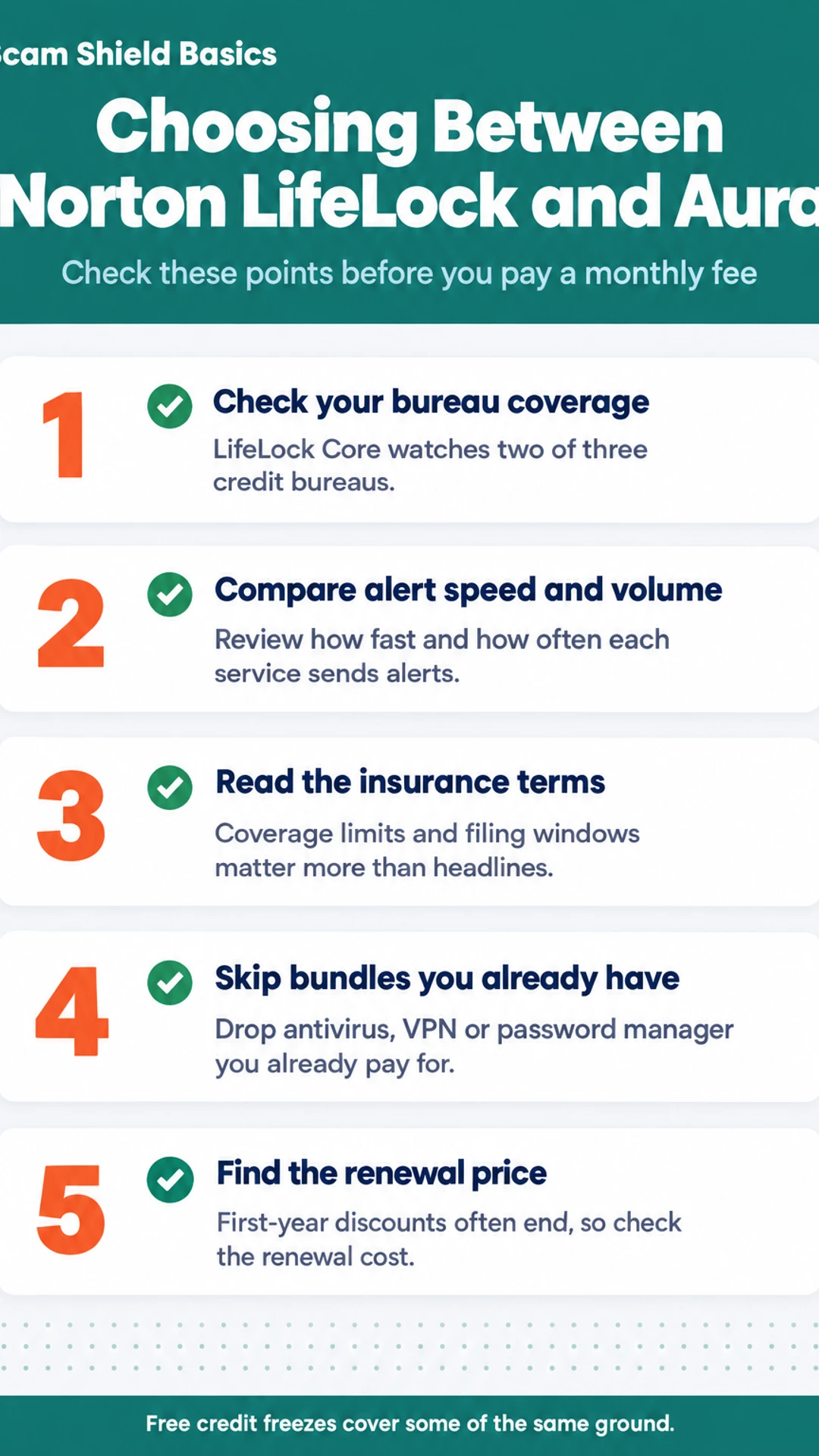
Credit monitoring means the service watches your credit file and tells you when something changes, such as a new account opened in your name. The key detail is which credit bureaus each plan covers. Experts commonly tie that coverage to how many bureaus are watched, so check the bureau list for the specific tier you are considering. A plan that watches only one bureau can miss a new account reported to another. According to Finance Pulse's walkthrough, LifeLock's credit lock covers only TransUnion, so a lock alone will not protect the other two files.
How many alerts will you get?
Dark web and account alerts tell you when your personal information shows up somewhere it should not. The volume of alerts varies a lot. In The Opt Out Project's review, a competing service surfaced more dark web alerts than LifeLock in a head-to-head test. Fewer alerts is not automatically better, so look at what each service actually tells you.
What does insurance pay, and under what conditions?
Identity theft insurance can reimburse certain costs tied to recovering from theft. Read the conditions before you rely on any dollar figure. Coverage limits, what counts as an eligible expense, and whether you must file within a set window all matter. Ask for the written policy, not just the headline amount.
Does a person handle the paperwork?
Recovery help is where you decide whether you want someone to do the calls for you. Some plans offer a specialist who works with your banks and credit bureaus. Others give you a guide and leave the calls to you. Check whether an actual person handles the work or whether it is a checklist.
The Extras You May Not Need
Both Norton LifeLock and Aura sell more than monitoring. Part of what you pay for is a bundle of other tools, and it helps to know which ones you already have before you compare prices.
Do you already have a VPN, antivirus or password manager?
Many buyers do. Check before you pay for a second copy.
- Antivirus: Norton's plans include antivirus for your devices. Aura also bundles device protection on its family plans. If you already run a paid antivirus, you are paying twice.
- VPN: Norton includes a VPN. Aura's offering varies by plan. A VPN hides your traffic on public Wi-Fi, but it does not stop identity theft on its own.
- Password manager: Both brands include one at higher tiers. If you already use a manager your browser or phone provides, this feature adds little.
If you already have these, drop them from your decision.
What is data broker removal, and does it run on its own?
Data brokers collect personal details such as addresses, phone numbers and relatives' names, then sell them. Removal services ask those sites to delete your records.
In Finance Pulse's walkthrough of LifeLock, the reviewer says the removal runs automatically and repeats every 90 days. That reviewer keeps the subscription for this reason. Removal is also slow to see and hard to check yourself, so it is worth asking whether you want it.
Does the bundle justify the price if you only want alerts?
Probably not, if alerts are all you want. Ask yourself:
- Do I want to be told when my information shows up on the dark web or in a new credit account?
- Would I use a VPN, antivirus or password manager I already have?
- Do I care about data broker removal enough to pay a monthly fee for it?
If you answered yes only to the first question, compare the core monitoring plan on its own. Free credit freezes and free credit reports from the bureaus cover some of the same ground at no cost.
Pricing, Tiers and Renewal
Pricing is the part that changes most, so treat any figure here as a starting point and check the vendor's current page before you buy. Both companies adjust plans and promotional offers often.
As of this writing, a reviewer in the Opt Out Project's test listed LifeLock Core at $12.49 a month and LifeLock Advanced at $19.99 a month. Core monitors two of the three credit bureaus. Three-bureau monitoring is the main reason to pay for the higher tier. Family coverage and Aura's own tiers are priced differently, so compare the plan that matches your household size rather than the lowest headline number.
Here is what to look at when you compare:
- Individual or family? Confirm how many people the plan covers and whether children or other adults are included.
- Which bureaus are monitored? Two bureaus or all three is a real difference.
- What is the insurance limit and its conditions? Read the policy terms, not the marketing page.
- What is the renewal price? This is often where the cost jumps.
What happens after the first year?
First-year offers are usually discounted. Renewal prices are often higher, and the discount can end without much warning. Before you buy, find the renewal price in the checkout terms or the plan's fine print. If you cannot find it, ask support in writing.
A free credit freeze at each bureau and free credit reports cover some of what these services offer. Decide whether the paid features are worth the renewal cost to you, not just the first payment.
Setup, Alerts and Customer Service
How long does setup take?
Reviewers report that the LifeLock setup is fairly quick. In Finance Pulse's walkthrough, the whole process took about 20 minutes, covering plan selection, signup, credit locking, alerts and monitoring. Linking a bank account through Plaid took about 30 seconds per account, and the reviewer said it needed no further attention afterward.
Setup for Aura is not covered by the reviewers cited here, so a direct time comparison is not possible. Plan on a similar sitting for either service, then check that your accounts are linked correctly.
How fast are the alerts?
In The Tech Roost's side-by-side testing, the reviewer simulated a credit check or major purchase and found LifeLock consistently came in last on alert speed, citing 2 to 3 minute alerts for modest services. The reviewer also said LifeLock's dark web alerts came in noticeably lower in volume than the top pick.
What is customer service like?
This is where the two experiences feel most different.
- LifeLock: In The Tech Roost's first on-camera signup call, the representative would not let the reviewer hang up before pitching a coverage upgrade. Finance Pulse's reviewer also got an upgrade pitch on a support call, though the rep was responsive.
- Aura: The Tech Roost's reviewer found the support call friendlier and more helpful, with no upsell.
I would expect any service to try to sell you something, so ask on the call what you are actually getting before you agree to anything.
Do You Need a Paid Plan at All?
Before you compare brands, it helps to know what you can already do for free. A lot of the protection people pay for is available at no cost, if you are willing to do the work yourself.
Free tools cover more than most people expect. You can place a credit freeze with each of the three bureaus, Equifax, Experian and TransUnion, and it stops new accounts from being opened in your name. A fraud alert tells lenders to verify your identity before extending credit, and it lasts one year. You can also pull your free credit reports at AnnualCreditReport.com and check them for accounts you do not recognize.
What a paid plan adds is mostly convenience and help:
- Ongoing alerts that tell you about changes without you checking
- Monitoring of dark web sites and some financial activity
- Insurance or reimbursement for certain costs, with conditions you should read closely
- Someone to help with paperwork if your identity is stolen
Free tools may be enough if you are mostly worried about a single breach, you are comfortable checking your reports every few months, and you can handle a recovery yourself. A paid service starts to make sense if you want alerts without doing the checking, you have already been targeted by fraud, or you would rather pay someone to deal with the banks and bureaus. Be clear about what each piece costs you, including renewal prices.
Which One Fits Which Buyer
The short answer: LifeLock tends to fit people who want the Norton name and bundled antivirus or VPN and are willing to pay for them. Aura tends to fit people who mainly want monitoring and insurance at a lower price, with fewer tiers to sort through.
LifeLock may suit you if:
- You already use Norton antivirus or want it bundled into one subscription.
- You want a VPN included and do not mind paying more for it.
- You like the familiar brand and want one company handling your online security.
Aura may suit you if:
- Your main goal is credit and account monitoring plus insurance for identity theft.
- You want fewer plan levels and a simpler choice.
- You would rather not pay for antivirus or a VPN you already have elsewhere.
In a YouTube review by The Tech Roost, the reviewer also described Aura as the better fit for most people, citing lower cost and no tier structure. That is one reviewer's view, not a test we ran ourselves.
Quick answers
Is Aura legitimate? Aura is an established company that sells monitoring and insurance. Read its insurance terms and privacy policy before you buy, since the details of any reimbursement matter more than the headline amount.
Can two people share one subscription if they share an SSN? Plans are typically set up per person, and a Social Security number belongs to one individual. Check each plan's terms on family coverage before assuming it works that way.
What does it cost each month? Prices change and renewal rates can differ from the first-year offer. We have not verified current pricing, so check the sign-up page and the renewal terms before you pay.
What hands-on reviewers found
These are other people's hands-on tests, summarised and credited to them. Watch the full videos for their complete reviews.
Finance Pulse: LifeLock Tutorial 2026: Full Setup Walkthrough & Honest Review 🛡️
The reviewer thinks LifeLock is worth paying for mainly for its automated data broker removal and alerts, while noting it has real gaps: the credit lock covers only TransUnion, Core lacks scam coverage, and cancelling does not lift the lock
- The whole LifeLock setup took about 20 minutes, covering plan selection, signup, credit locking, alerts and monitoring. (at 0:18)
- Connecting a bank account through Plaid took about 30 seconds per account, and the reviewer says it needs no further attention afterward. (at 1:36)
- The reviewer says the credit lock and payday loan lock can be toggled from a phone, which matters when someone is at a car dealership. (at 2:45)
The Tech Roost: Lifelock Review - Here’s Who It’s Actually For
The reviewer thinks LifeLock is a legitimate product but suited only to a specific buyer who wants the Norton name, antivirus and VPN and will pay more for them, and considers Aura the better fit for most people.
- Compared to the rest of the category, LifeLock has real strengths: brand recognition, a strong VPN, and antivirus from the Norton ecosystem that does not slow the computer down. (at 0:34)
- In side-by-side testing that simulated a credit check or major purchase, LifeLock consistently came in last on alert speed, with the reviewer citing 2 to 3 minute alerts for modest services. (at 2:59)
- During the reviewer's first on-camera LifeLock signup call about a hypothetical problem, the representative would not let them hang up before pitching a coverage upgrade. (at 4:20)
Frequently asked questions
Is Aura identity theft protection legitimate?
Yes, Aura is a real company that sells identity theft and fraud monitoring. It watches for your personal data showing up in breaches or on the dark web, and it sends alerts when new accounts or credit activity appear in your name. As with any paid service, check exactly what each plan includes before you sign up, because coverage differs between tiers.
What is the downside of Aura?
The main downside is that Aura cannot do anything a free credit freeze cannot. A freeze with each of the three credit bureaus stops new accounts from being opened in your name at no cost. Aura's extras are alerts, monitoring and help with recovery paperwork, so you should decide whether those are worth a monthly fee for you.
How much does Aura cost per month?
Aura's pricing varies by plan and changes over time, so the figure on its current pricing page is the one to trust. Compare the first-year rate with the renewal rate, since renewal prices are often higher. Also check whether the plan you want covers the whole family or only one person.
Is it safe to put my SSN in Aura?
Giving a monitoring service your Social Security number is a trade-off. Aura needs it to check whether your identity appears in records, and you should read its privacy policy to see how it stores and shares data. If you prefer not to share it, you can still use free credit freezes and free credit reports from the bureaus.
Who should choose Aura over LifeLock?
Aura suits people who want identity monitoring and alerts without bundled antivirus or VPN, and who want a service that is simple to understand. LifeLock may fit better if you already use Norton products and want them in one subscription. Other reviewers have compared the two, and their findings are worth reading alongside the official plan details.
Wrapping up
Aura and LifeLock both sell monitoring and recovery help, but neither replaces free credit freezes. Pay only for the features you will actually use, and check the renewal price before you commit.
Which of these features matters most to you, alerts or recovery help? Tell us in the comments.